
Mica Sheet Cutting Edge Damage Prevention: How to Keep Edges Clean and Functional
Cutting mica sheet sounds straightforward. You score it, you snap it, you move on. Except the edges never come out clean. They chip, they delaminate, they fray into layers that peel apart during installation. The bulk of the sheet is fine but the edges are ruined. That is the story in almost every mica cutting operation I have seen. The problem is not the material — it is how the cut is made and what happens to the edge afterward. A perfect cut with zero edge damage is possible, but it requires understanding exactly why mica edges fail and building your cutting process around that reality.
Why Mica Sheet Edges Break Down During Cutting
The Cleavage Planes Work Against You
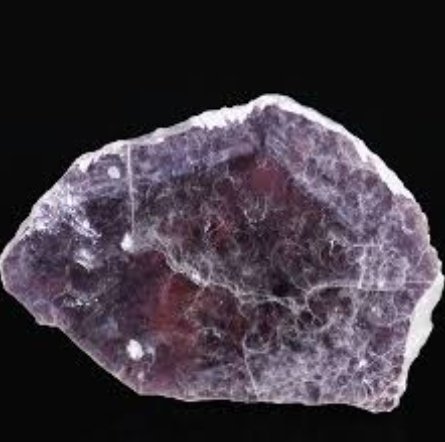
Mica is a layered mineral. The crystal structure splits easily along flat planes. That is great when you want to exfoliate mica into thin sheets. It is terrible when you want a clean cut edge. The moment your blade applies force, the stress concentrates along the cleavage planes nearest the cut line. Instead of shearing through the material cleanly, the blade pushes the layers apart. The edge splits into multiple thin layers that separate from each other.
This is why mica sheet edges look ragged under a microscope. The cut did not go through the material — it went between the layers. The top five or six layers came off clean but the layers underneath peeled away at an angle, leaving a stepped, layered edge that has no structural integrity.
The thinner the mica sheet, the worse this gets. A 0.5 millimeter sheet delaminates at the edge almost every time you cut it with a standard blade. A 2 millimeter sheet holds up better but still shows edge separation if the blade is dull or the feed speed is too high.
Heat From Friction Softens the Binder
Most mica sheet is not pure mica. It contains binders — epoxy, phenolic, silicone, or resin-based adhesives that hold the mica flakes together. When you cut, friction generates heat at the blade-material interface. That heat softens the binder right at the edge. A softened binder cannot hold the layers together. The edge delaminates even before the blade finishes the cut.
The faster you cut, the more heat you generate. High-speed cutting without cooling is the single biggest cause of edge delamination in mica sheet. The blade slices through but the heat destroys the binder before the cut is complete. By the time the piece separates, the edge is already falling apart.
Vibration Creates Micro-Cracks Before the Cut Even Starts
Every cutting tool vibrates. That vibration transmits into the mica sheet and creates micro-cracks along the cleavage planes. These cracks are invisible to the naked eye but they weaken the edge before the blade even reaches it. When the blade finally arrives, it does not cut through solid material — it cuts through material that is already cracked. The edge shatters instead of shearing.
This is why waterjet cutting produces cleaner edges than mechanical cutting in most cases. The waterjet does not vibrate. It cuts with a stream of high-pressure water that separates the material without mechanical shock. The edge comes out smooth because there are no micro-cracks to propagate.
Cutting Methods That Minimize Edge Damage
Diamond Blade Cutting Works If You Do It Right
Diamond-coated blades are the standard for cutting mica sheet. They work well when used correctly and destroy edges when used carelessly. The key is feed speed. Too fast and you generate heat. Too slow and you create excessive friction that also generates heat. The sweet spot is a moderate, steady feed rate that lets the diamond particles cut without overheating the binder.
Use a continuous feed — do not stop and start. Every stop creates a heat buildup at the cut point. The blade dwells in one spot, the binder softens, and the edge delaminates. Keep the blade moving at a constant speed from one end of the cut to the other.
Wet cutting is mandatory for diamond blade work on mica sheet. A steady stream of deionized water cools the blade and the material simultaneously. The water also suppresses dust, which is a respiratory hazard and an edge contaminant. Dry cutting with a diamond blade on mica sheet is asking for trouble — the edges will chip and the binder will degrade within minutes.
Laser Cutting Produces the Cleanest Edges
If edge quality is your top priority, laser cutting is hard to beat. A CO2 laser or fiber laser cuts mica sheet with zero mechanical contact. No vibration. No friction. No blade deflection. The edge comes out smooth, sealed, and structurally sound.
The laser does have limitations. It cuts slower than mechanical methods and it can cause thermal damage if the power setting is too high. Excessive laser power heats the binder and causes carbonization at the edge. The edge turns dark and brittle. Keep the power low enough to cut through but not so high that the binder burns.
Laser cutting also produces a heat-affected zone — a narrow band along the cut edge where the binder has been partially altered. This zone is usually under 0.1 millimeters wide and does not affect most applications. But for high-precision electrical insulation work, even that small zone can reduce dielectric strength. Test the edge after laser cutting if dielectric performance is critical.
Waterjet Cutting Is the Best Balance of Speed and Edge Quality
Waterjet cutting uses a high-pressure stream of water mixed with abrasive garnet particles to cut through mica sheet. No heat. No vibration. No blade contact. The edge comes out clean with minimal delamination.
The downside is taper. Waterjet cuts are not perfectly vertical — they taper slightly from top to bottom. For most mica sheet applications, this taper is negligible. But if you need perfectly parallel edges for tight-tolerance assemblies, waterjet may not be precise enough.
Waterjet also wets the material. The mica sheet comes out of the cut soaked. You need to dry it thoroughly before installation. Trapped moisture at the cut edge causes binder degradation and reduces adhesion. Dry the sheet with clean, oil-free compressed air or in a low-temperature oven below 60 degrees Celsius.
Scoring and Snapping Works for Thick Sheets Only
The old-school method — score with a sharp tool, then snap along the line — works for thick mica sheet above 1 millimeter. It does not work for thin sheet. The score line creates a stress concentration that causes the sheet to split along cleavage planes instead of breaking cleanly along the score.
If you must score and snap, use a tungsten carbide scribe with a fresh tip. Press firmly enough to create a visible groove but not so deep that you cut through the entire thickness. Snap the sheet with a quick, firm bend away from the score line. A slow bend causes the crack to wander and the edge to chip.
Edge Protection After Cutting
Seal the Edges Immediately
The moment you cut a mica sheet, the edge is vulnerable. Moisture in the air starts attacking the binder. Dust settles on the raw edge and works into the delaminated layers. Every minute that passes without protection makes the edge worse.
Apply an edge sealant within five minutes of cutting. Silicone-based sealants work well for most mica grades. Epoxy-based sealants work better for high-temperature applications. The sealant fills the gaps between delaminated layers, bonds the exposed mica surfaces, and creates a moisture barrier.
Do not use superglue or cyanoacrylate on mica edges. It bonds too rigidly and cracks when the sheet flexes. The crack propagates into the mica and makes the edge worse than it was before sealing. Use flexible sealants that move with the material, not against it.
Grind the Edges Lightly If They Are Rough
If the cut edge is rough or has minor chips, a light pass with a fine-grit diamond stone can smooth it out. Use a grit between 400 and 800. Do not use coarse grit — it removes too much material and creates new micro-cracks.
Grind with light, even pressure. Do not dwell in one spot. A single pass is usually enough. After grinding, clean the edge with deionized water and a lint-free cloth to remove all dust and debris. Any particle left on the edge becomes a stress concentrator that initiates cracks under thermal or mechanical load.
Bevel the Edges for High-Stress Applications
For mica sheet used in high-voltage insulation or high-temperature environments, a small bevel on the cut edge improves performance. A bevel removes the sharp corner where stress concentrates and creates a gradual transition from the face to the edge.
Use a fine diamond file or a rotary tool with a diamond bit to create a bevel of 0.5 to 1 millimeter. The bevel angle should be between 30 and 45 degrees. A steeper bevel does not remove enough stress. A shallower bevel removes too much material.
After beveling, seal the edge as described above. The bevel exposes more surface area, so the sealant needs to cover a larger area. Apply a generous coat and let it cure fully before handling the sheet.
Common Cutting Mistakes That Destroy Edges
Using the Wrong Blade for the Thickness
A blade designed for thick mica sheet will chatter and vibrate on thin sheet. A blade designed for thin sheet will flex and wander on thick sheet. The mismatch causes edge damage every time.
Match the blade to the material thickness. For sheet under 0.5 millimeters, use a ultra-thin diamond blade with a kerf under 0.1 millimeters. For sheet between 0.5 and 2 millimeters, use a standard thin-kerf diamond blade. For sheet above 2 millimeters, a thicker blade with more diamond concentration works better.
Cutting Without Support Underneath
Mica sheet flexes when you cut it. The flex causes the blade to wander and the edge to chip. Always support the sheet from underneath with a flat, rigid backing board. The backing board must be harder than the mica — use aluminum, steel, or a dense composite. Do not use wood or cardboard — they flex under the blade and transmit that flex into the mica.
The backing board also catches the cut piece cleanly. Without it, the piece falls away and the free end of the sheet vibrates, cracking the edge. Clamp the sheet to the backing board with low-tack tape or vacuum hold-downs. The clamp must hold the sheet flat but not so tight that it cracks the material.
Ignoring Blade Wear
A worn diamond blade does not cut — it grinds. And grinding generates heat. Heat destroys the binder. A blade that is past its useful life produces edges that look like they were torn apart.
Check the blade every 50 cuts. Look for dull spots, missing diamond segments, or excessive wear on the cutting edge. Replace the blade at the first sign of degradation. A new blade costs almost nothing compared to the scrap material you lose from bad edges.
Cutting in a Dirty Environment
Dust on the cutting surface gets trapped in the fresh edge. Every particle becomes a defect. The edge looks clean but it is full of contaminants that reduce adhesion and dielectric strength.
Cut mica sheet in a clean, dust-controlled area. Wipe the surface with deionized water before cutting. Wipe the blade between cuts. Keep the work area swept and vacuumed. A clean environment produces clean edges. A dirty environment produces edges that fail during installation.
Handling Cut Pieces to Preserve Edge Quality
Do Not Grab Cut Pieces by the Edge
The cut edge is the weakest part of the sheet. Gripping it bends the layers apart and starts delamination before the piece even reaches the installation point. Always handle cut mica sheet by the flat surfaces, never by the edges.
Use suction cups or flat-jaw grippers for moving cut pieces. If you must pick up a piece by hand, support it from underneath with your other hand so the edge does not bear any load.
Stack Cut Pieces With Separators
Stacking cut mica sheet directly on top of each other causes edge-to-edge contact. The sharp edges cut into the adjacent sheet surface, creating scratches and stress points. Use kraft paper, tissue paper, or thin plastic film between every sheet in a stack.
The separator must be clean and dry. A wet separator transfers moisture to the cut edge. A dirty separator deposits particles into the edge. Change separators between every stack. Do not reuse a separator that has been in contact with a cut edge.
Store Cut Pieces Flat, Not on Edge
Storing mica sheet on its edge puts the full weight of any stack above it on the cut edge. The edge compresses, the layers separate, and the piece becomes unusable. Store every cut piece flat on a level surface with nothing on top of it.
If you must stack cut pieces, limit the stack height to five sheets maximum. Use a flat, rigid shelf — not a wire rack that allows the pieces to sag. Sagging creates a bending stress at the cut edge that initiates delamination over time.